Submodules allow us to keep a Git repository as a subdirectory of another Git repository. This lets us include and track external dependencies or shared code in the repo itself while maintaining their own separate version history.
Additionally, the shared code are pointing to a specific commit instead of the latest version. This can help guarantee that the repo will not break due to breaking changes from the external sources.
Basic Setup
Add Submodule
Adding a submodule to existing Git repository can be performed with the submodule add command.
git submodule add <repository-url> <path>For example, if we want to add a library called shared-utils to a libs directory:
git submodule add https://github.com/username/shared-utils.git libs/shared-utilsThis creates a new directory at the specified path and tracks the submodule in a .gitmodules file at the repository root.
Commit Submodule
The submodule added needs to be committed together with the .gitmodules file.
git add .gitmodules libs/shared-utils
git commit -m "Add shared-utils submodule"Cloning Project with Submodules
When cloning a repository with submodule, the submodule directories will be empty by default. They need to initialize separately.
git clone <your-repository-url>
cd <your-repository>
git submodule init
git submodule update
Fortunately, there is a one-liner clone command to do the same by passing the --recurse-submodules flag when cloning.
git clone --recurse-submodules <your-repository-url>Common Operations
Update Submodule
Here is how we can update the submodule library to the latest commit from the origin. All we need to do is to move into the directory of the submodule, pull the latest change and return to the root of the repository to commit the update.
cd libs/shared-utils
git pull origin main
cd ../..
git add libs/shared-utils
git commit -m "Update shared-utils submodule"
To update all submodules at once, use the following command.
git submodule update --remoteCheck Status
The status of all the submodules can be inspected by running the following command.
git submodule statusThen, for each submodule, it will output something like below.
a1b2c3d4e5f6g7h8i9j0k1l2m3n4o5p6q7r8s9t0 libs/shared-utils (v1.2.3)Let's break down the cryptic output. The format for the output is shown below.
[status indicator][commit hash] [path] [(tag/branch)]The first character is the status indicator. It tells us the status of the respective submodule. There are 4 kinds of status indicator.
-- The submodule is not initialized yet (empty directory)+- The submodule is checked out to a different commit than what the parent repo expects (changes were made locally but haven't committed the change)U- The submodule has merge conflicts
Demo
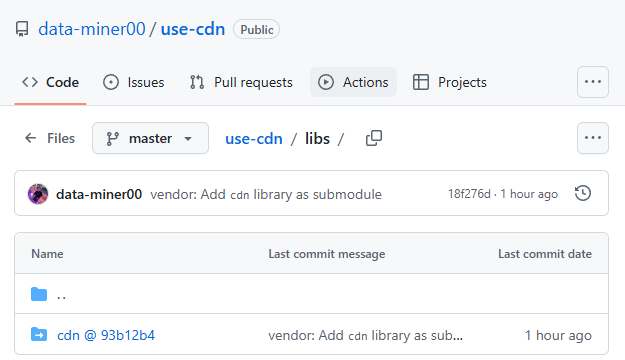
I've set up two GitHub repository to demonstrate the concept. Feel free to clone them for hands-on experience.
GitHub represents submodules with a hyperlink to the original repository along with the current hash commit of the library (submodule @ hash).
Summary
Submodules are helpful for
- Reuse code from another Git project
- Lock the library or dependency at a specific commit
- Keep histories of projects separate without committing the full 3rd party codes into the repo