Git Cherrypick is a feature that allows us to copy a specific commit from one branch to the other without needing to merge the two branch together.
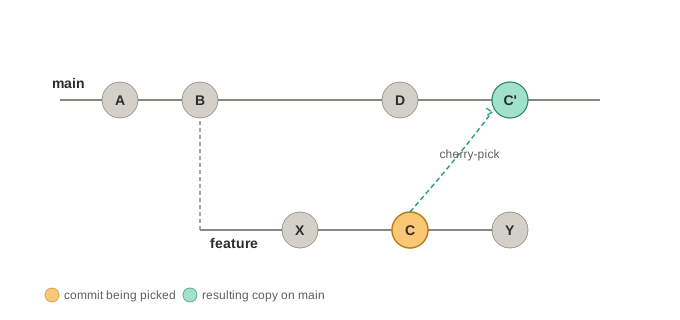
The diagram above illustrates the intention to move the C commit from feature branch to C' in main branch. Cherry-pick creates a new commit hash instead of moving the commit with metadata one-to-one.
Basic Usage
This is helpful when we have committed wrongly to the main branch, while we should commit to the feature branch feat/awesome-feature instead.
In this case, grab the hash for the commit in the main branch first.
git log --onelineThen copy the hash and checkout to the feat/awesome-feature branch. Finally, just use the git cherry-pick command and provide the hash copied as the argument.
git checkout feat/awesome-feature
git cherry-pick <the commit hash>
This should successfully copied over the commit without manually working on this. After that, checkout main and remove the accidental commit using git reset.
git checkout main
git reset --hard HEAD~1 # remove commit from mainNo Commit
Sometimes, it is helpful if we want to copy over the commit and make some changes first without commiting directly. In this case, use the -n flag that is short for --no-commit.
git cherry-pick -n <hash>
# make some tweaks...
git commit -m "Applied fix with adjustments"Handling Conflicts
Cherry-pick can still face conflicts just like merging does. In that case, we can resolve it manually and then continue or abandon the cherry-pick process.
git cherry-pick <hash>
# CONFLICT! git pauses here

# 1. Fix the conflicting files
# 2. Stage them
git add <fixed-files>

# 3. Continue the cherry-pick
git cherry-pick --continue

# OR, abandon it
git cherry-pick --abort